GS1 standards
Our commitment to the GS1 standards and the state of implementation
The STRICH Barcode Scanning SDK supports GS1 barcode standards. We are a registered GS1 Solution Partner in Switzerland and continuously monitor and implement the standards set by GS1.
At a glance
- STRICH reads GS1-128, GS1 DataBar, GS1 Data Matrix, GS1 QR Code, EAN/UPC and ITF.
- GS1 Digital Link QR codes work out of the box.
- 1D and 2D barcodes in one SDK, ready for GS1 Sunrise 2027.
- We are a registered GS1 Solution Partner in Switzerland.
GS1 Sunrise 2027
The GS1 Sunrise 2027 initiative promotes the adoption of 2D barcodes, such as QR codes, to enhance product identification and data sharing. Unlike traditional 1D barcodes, 2D codes can store more information, including expiration dates, batch numbers, and web links.
Standards like GS1 Digital Link play a key role by connecting these codes to online resources, enabling richer consumer engagement, streamlined supply chain processes, and improved traceability. By 2027, GS1 aims to make 2D codes the standard across industries, ensuring compatibility and innovation through its global standards framework.
We personally believe 1D barcodes still have a long way to go yet, but with STRICH you have a solution that can scan both 1D and 2D barcodes, so you can be confident that your GS1 needs will be met.
GS1 Digital Link
GS1 Digital Link is a standard format for embedding product information in a QR code. The product information is encoded as a sequence of GS1 Application Identifiers (AIs). The URL points to a web location where additional information about the product can be found, and has well-defined format, as defined in the GS1 Digital Link URI syntax specification.
STRICH implicitly supports GS1 Digital Link QR Codes because it supports reading ISO-compliant QR Codes.
Example: GS1 Digital Link QR CodeThe QR code below is an example of a GS1 Digital Link QR code.

The URL encoded in the QR Code is: https://strich.io/01/09505180101011/22/123/10/L99/21/S123456.
Dissecting the URL reveals the following product information:
| AI | Name | Meaning | Value |
|---|---|---|---|
01 | GTIN | Global Trade Item Number of the product | 09505180101011 |
22 | CPV | Consumer product variant | 123 |
10 | BATCH/LOT | Batch or lot number | L99 |
21 | SERIAL | Serial number | S123456 |
Please refer to GS1 Application Identifiers for the full list of available Application Identifiers.
GS1 symbologies
GS1 data can be encoded in several barcode symbologies. A special FNC1 character tells the scanner that the barcode contains GS1 Application Identifiers. These are the GS1 symbologies and how STRICH supports them.
To turn the scanned data into structured JSON, with one field per Application Identifier, follow the Reading GS1 Data guide in our documentation.
GS1-128 barcode
The GS1-128 barcode is a subset of the Code 128 symbology which uses a special "flag", the Function Code 1 or FNC1 character to indicate that it contains GS1 Application Identifiers. The AIs are encoded in the barcode as well as printed underneath it as part of the human-readable interpretation.
Example: GS1-128 BarcodeThe barcode below is an example of a GS1-128 barcode.
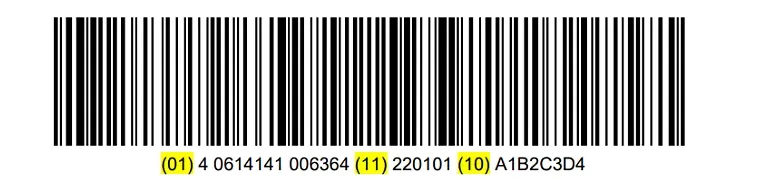
The GS1-128 barcode encodes the following AIs:
| AI | Name | Meaning | Value |
|---|---|---|---|
01 | GTIN | Global Trade Item Number of the product | 40614141006364 |
11 | PROD DATE | Production date (YYMMDD), January 1, 2022 | 220101 |
10 | BATCH/LOT | Batch or lot number | A1B2C3D4 |
GS1 Data Matrix
GS1 DataMatrix is the ISO/IEC recognised and standardised implementation of the use of the Data Matrix 2D barcode symbology.
A special codeword FNC1 codeword is added to the start of the encoded data, flagging it as a GS1 Data Matrix containing GS1 Application Identifiers.
Please refer to GS1 Data Matrix Guideline for details.
Example: GS1 Data Matrix CodeThe code below is an example of a GS1 Data Matrix code.
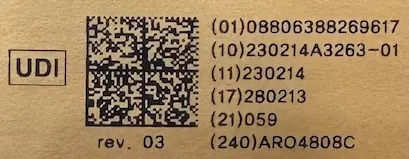
The following AIs are encoded:
| AI | Name | Meaning | Value |
|---|---|---|---|
01 | GTIN | Global Trade Item Number of the product | 08806388269617 |
10 | BATCH/LOT | Batch or lot number | 10230214A3263-01 |
11 | PROD DATE | Production date (YYMMDD), February 14, 2023 | 230214 |
17 | EXPIRY | Expiration date (YYMMDD), February 13, 2028 | 280213 |
21 | SERIAL | Serial number | 059 |
240 | ADDITIONAL ID | Manufacturer ID | ARO4808C |
Please refer to Reading GS1 Data for a guide on how to read GS1 data in Data Matrix codes.
GS1 QR Code
GS1 QR Code is a subset of the QR Code symbology that uses a special FNC1 character at the beginning of the encoded data to signal that the QR code contains GS1 AIs.
Example: GS1 QR CodeThe code below is an example of a GS1 QR code.
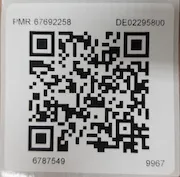
The following AIs are encoded:
| AI | Name | Meaning | Value |
|---|---|---|---|
10 | BATCH/LOT | Batch or lot number | 6787549 |
91 | INTERNAL | Company-internal information | 243595 |
92 | INTERNAL | Additional company-internal information | 1011 |
240 | ADDITIONAL ID | Manufacturer ID | DE02295800 |
241 | CUST. PART No. | Customer part number | 67692258 |
8008 | PROD TIME | Date and time of production (YYMMDDhhmmss) | 230105091020 |
21 | SERIAL | Serial number | 219967 |
See Reading GS1 Data on how to read GS1 data in QR codes.
GS1 MaxiCode

STRICH currently does not support the MaxiCode symbology. If you would like us to change that, please contact us at hello@pixelverse.ch and tell us more about your use case.
Frequently asked questions about GS1 barcodes
Which GS1 barcodes does STRICH support?
STRICH reads EAN/UPC, ITF, GS1 DataBar, GS1-128, GS1 Data Matrix and GS1 QR Code, including GS1 Digital Link QR codes. MaxiCode is currently not supported. See all supported barcode types.
What is a GS1 Application Identifier (AI)?
An Application Identifier is a numeric prefix that defines the meaning and format of the data that follows it. For example, AI 01 is the GTIN, AI 10 the batch or lot number, AI 17 the expiry date and AI 21 the serial number. GS1 publishes the full list of Application Identifiers.
What is GS1 Sunrise 2027?
GS1 Sunrise 2027 is an industry initiative for retail point-of-sale systems to be able to read 2D barcodes, such as QR codes and Data Matrix, by the end of 2027. 2D barcodes can carry more data than a traditional EAN/UPC barcode, like batch numbers, expiry dates and web links.
What is GS1 Digital Link and does STRICH support it?
GS1 Digital Link is a standard for encoding product data as a web URL, usually in a QR code. The path of the URL contains GS1 Application Identifiers, like the GTIN and serial number. STRICH reads GS1 Digital Link QR codes like any ISO-compliant QR code, and returns the URL for your app to process.
What is the difference between GS1-128 and Code 128?
GS1-128 is a Code 128 barcode that starts with the special FNC1 character, flagging that the barcode contains GS1 Application Identifiers. The same principle applies to GS1 Data Matrix and GS1 QR Code.
What is the difference between GS1 Data Matrix and Data Matrix?
GS1 Data Matrix is a regular Data Matrix code with an FNC1 codeword at the start of the data, indicating that the content is structured as GS1 Application Identifiers. Read more about scanning Data Matrix codes.
Can STRICH read UDI codes on medical devices and medication?
Yes. Unique Device Identification (UDI) codes are commonly printed as GS1 Data Matrix codes, which STRICH reads. Schedule2 uses STRICH to scan the small GS1 Data Matrix codes on vials, read the Schedule2 case study.
How do I read GS1 data from a scanned barcode?
STRICH returns the encoded data of the barcode, including the GS1 Application Identifiers. The Reading GS1 Data guide in our documentation explains how to access and interpret it.
Can I scan GS1 barcodes in a web browser?
Yes. With STRICH, GS1 barcodes are scanned with the smartphone camera directly in a web app, without installing a native app. Scanning runs entirely on the device and also works offline.
Is STRICH a GS1 Solution Partner?
Yes. Pixelverse GmbH, the company behind STRICH, is a registered GS1 Solution Partner in Switzerland.
Does STRICH support MaxiCode?
Not currently. If you need MaxiCode, please contact us at hello@pixelverse.ch and tell us about your use case.
Still have questions? Check out the full FAQ.