Barcode scanning in web apps
A look at the technical, financial and organizational aspects of moving barcode scanning processes to web apps.
Why scan barcodes in the browser?
The web is a mature platform for application development. TypeScript/JavaScript and modern browser APIs make it easy to write capable apps that interface with the physical world while running directly in the web browser.
Eliminating physical hardware reduces cost
Instead of buying a fleet of physical barcode scanners for your team, existing smartphones can be used instead. Especially for smaller businesses, the cost savings can be significant.
Case study: Elminate Barcode Scanning Hardware with STRICH
Easy to develop
Even though advanced barcode scanners can run apps by themselves, they are typically harder to write and maintain. Web apps on the other hand are portable, easy to write, and can interface more easily with your existing ERP software, APIs and databases.
According to Stackoverflow's 2025 Developer Survey, JavaScript is the most popular programming language in the world. Chances are, your business already has developers familiar with web tech, and you don't need outside help to build your in-house apps. AI coding agents like Claude Code or Codex are trained on vast amounts of web app code and consequently very good at writing web apps.
Writing web apps instead of native apps is also more cost-effective. Instead of targeting iOS and Android (and possibly Windows), you can write your apps using a single language, JavaScript. For strong typing, you can use TypeScript, a typed superset of JavaScript. Developing for the web targets a mature, open and dependable platform, instead of a vendor-specific platform like iOS or Android.
Easy to distribute
One of the the biggest advantage of using deploying web apps over native ones for your in-house and B2B apps is distribution. You are in control of the distribution channel.
Native apps are published on the vendor App Store, making it easy for users to find the app. But app stores are built for consumers. A lot of time is spent on preparing assets such as screenshots in a variety of dimensions, completing privacy statements and agreeing to ever-changing terms of service. If the platform operator decides that your app no longer complies with its guidelines, is out-of-date or even a random mishap happens, your app maybe be removed and become unavailable – a horror scenario for business-critical apps.
Publishing new versions of your app require the app to first be reviewed, an opaque process that adds risk and an unpredictable delay to something that should be instant.
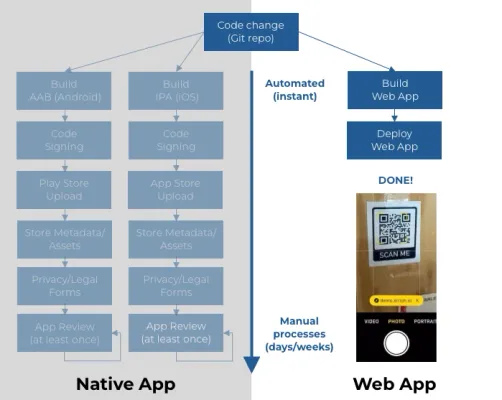
Distributing native apps vs. web apps
In contrast, distributing a web app is a process that can complete in seconds, and is fully under your control. There is no risk of your app becoming suddenly unavailable because someone forgot to check their email and failed to complete an export statement. You don't have to go begging Apple or Google to speed up their review of a critical update of your app.
Discovery / deep links
Discovery is often mentioned as an advantage of using native app stores. While this is true for B2C apps, it is less relevant for in-house or B2B apps.
Using QR codes can increase accessibility of your apps, and allows for context-specific deep linking. For instance, you can use different QR in geographically separate locations to pre-select the appropriate location in the app, or a driver flow entered by scanning a QR code in a vehicle.
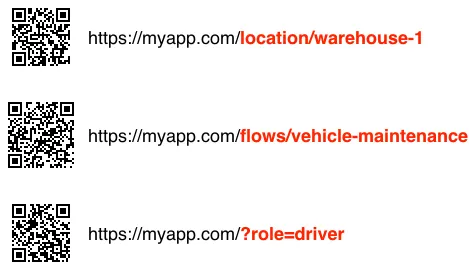
Three QR codes highlighting different deep links into an app
Interoperability
Larger businesses already run platforms on which their apps are deployed. These platforms already provide things authentication, access to ERP data. The typical way to write apps for these platforms is web apps.
We have successfully integrated our JavaScript barcode scanning library at customers using Salesforce (Lightning Web Components), SAP Fiori and OutSystems. Using JavaScript and open web APIs enables an entire set of interoperability scenarios that are not possible using native APIs or SDKs.