Published on: 10/12/2026 by Alex Suzuki
Structured Append QR codes
QR codes support a little-known feature called Structured Append. Structured Append splits a payload across multiple QR codes. It’s used for payloads too large to fit in a single QR code.
A QR code with Structured Append information contains three additional pieces of metadata:
- Symbol position: the number of this part, e.g. this is part number 2
- Symbol count: the total number of parts, e.g. 4 parts
- Symbol parity: a computed value over the entire data, before splitting it into parts. It lets a reader tell these parts apart from parts that belong to a different set of QR codes.
Example: Lorem ipsum
In this contrived example, we’ll encode 789 bytes of text into four parts of up to 256 bytes each. The text was generated using one of the many Lorem ipsum generators out there.
➜ ls -l lorem.txt
-rw-r--r--@ 1 ahs  staff  789 Sep 29 12:20 lorem.txt

➜ cat lorem.txt
Lorem ipsum dolor sit amet, consectetur adipiscing elit. Nulla condimentum facilisis posuere. Aliquam porttitor ex sed nisi efficitur, in iaculis est suscipit. Ut vestibulum dignissim purus. Nullam pharetra pellentesque dui a semper. Ut fermentum consequat magna nec porta. Nulla hendrerit auctor turpis at fermentum. Donec lobortis lobortis lorem, non lobortis quam scelerisque in. Vivamus id eleifend sem. Quisque felis ante, facilisis et mauris egestas, dignissim gravida elit. Aliquam lorem tellus, finibus eu semper non, eleifend vel orci. Maecenas mattis, ex nec fringilla posuere, enim augue egestas ligula, vitae vehicula nulla eros ac mi. Maecenas semper gravida luctus. Aenean mollis faucibus rutrum. Aliquam ac neque justo. Nunc eget dui tempor, commodo dui a, malesuada augue.
Splitting the input data
We’ll use the UNIX split tool to split the text into parts of 256 bytes each:
➜ split -b 256 -d lorem.txt part-This will give us four parts, three parts of 256 bytes, and one part with 21 bytes, the remainder of dividing 789 by 256.
➜ ls -l part-*
-rw-r--r--@ 1 ahs  staff  256 Sep 29 12:39 part-00
-rw-r--r--@ 1 ahs  staff  256 Sep 29 12:39 part-01
-rw-r--r--@ 1 ahs  staff  256 Sep 29 12:39 part-02
-rw-r--r--@ 1 ahs  staff   21 Sep 29 12:39 part-03
Generating Structured Append QR codes for each part
Using the popular Zint library and CLI, we can generate four Structured Append QR codes.
For every generated code, we set the position and the total count (e.g. 1 of 4) using the --structapp flag.
➜ zint --barcode QRCODE --structapp="1,4,0" -i part-00 -o qr_1_of_4.png
➜ zint --barcode QRCODE --structapp="2,4,0" -i part-01 -o qr_2_of_4.png
➜ zint --barcode QRCODE --structapp="3,4,0" -i part-02 -o qr_3_of_4.png
➜ zint --barcode QRCODE --structapp="4,4,0" -i part-03 -o qr_4_of_4.png
This gives us the following four QR codes:
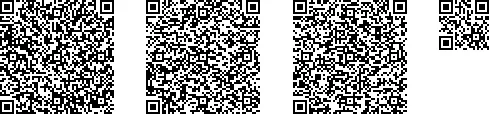
Unsurprisingly, the fourth QR code is smaller than the other ones, because it only encodes the remainder part. In some cases, the payload is padded to ensure that the resulting QR codes are of the same size.
Reading Structured Append QR codes using ZBar
To verify that our bag of QR codes indeed decodes into a single, coherent value, we can
use the zbarimg CLI of the ZBar library.
Running it on the combined image above, we get the following output:
➜ zbarimg --raw qr-all-parts.png
Lorem ipsum dolor sit amet, consectetur adipiscing elit. Nulla condimentum facilisis posuere. Aliquam porttitor ex sed nisi efficitur, in iaculis est suscipit. Ut vestibulum dignissim purus. Nullam pharetra pellentesque dui a semper. Ut fermentum consequat magna nec porta. Nulla hendrerit auctor turpis at fermentum. Donec lobortis lobortis lorem, non lobortis quam scelerisque in. Vivamus id eleifend sem. Quisque felis ante, facilisis et mauris egestas, dignissim gravida elit. Aliquam lorem tellus, finibus eu semper non, eleifend vel orci. Maecenas mattis, ex nec fringilla posuere, enim augue egestas ligula, vitae vehicula nulla eros ac mi. Maecenas semper gravida luctus. Aenean mollis faucibus rutrum. Aliquam ac neque justo. Nunc eget dui tempor, commodo dui a, malesuada augue.

scanned 1 barcode symbols from 1 images in 0.02 seconds
What about symbol parity?
In this example, we’ve omitted the symbol parity calculation and used the same value across all four codes. If you’re interested, ISO/IEC 18004:2015 specifies the parity calculation as follows:
The Parity Data shall be an 8-bit byte following the Symbol Sequence Indicator. The parity data is a value obtained by XORing byte by byte the byte values of all the original input data before division into symbol blocks. Mode Indicators, Character Count Identifiers, padding bits, Terminator and Pad Characters shall be excluded from the calculation.
Zint’s CLI does not see the full payload, so it can’t perform this calculation and instead relies on the caller supplying the value.
Conclusion
Structured Append allows encoding large payloads by spreading them over multiple QR codes.