Published on: 8/25/2026 by Alex Suzuki
What is the <usermedia> element?
The usermedia element, available from Chrome 151, is part of the Capability Elements suite, similar in spirit to the geolocation element which launched in Chrome 144. It provides a UI control for accessing the getUserMedia JavaScript API, which allows a page to access the user’s camera and microphone. STRICH uses getUserMedia extensively to obtain access to the camera’s video feed from which the SDK scans barcodes.
If your web browser supports it, you should see the element rendered below this text, likely as a button.
Assuming it is supported, pressing the button will ask you to grant access to the available video and audio input.
getUserMedia permissions
When attempting to access the getUserMedia API, the user is typically presented with a popup that asks them to grant permission to the camera.
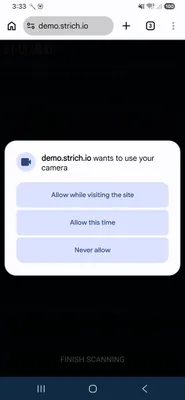
If the call to getUserMedia happens in a context where the user does not expect camera access to be necessary, the permission will likely be denied, and rightly so. This is by far the most common error scenario for users of our SDK. The app will usually display an error message and ask the user to retry.
The user experience gets even worse if the permission denial is persistent, and the user has to figure out how exactly they can revert their decision.
User intent
From the perspective of the browser, it is not clear if the request for camera access happened on behalf of the user, or random JavaScript code that may or may not be malicious. So it does the safe thing and asks the user. In contrast, an interaction with the usermedia element is assumed to be on behalf of the user, to quote the PEPC explainer:
Users’ interaction with this element carries with it a stronger signal of user intent than the pre-existing transient user activation, as the user agent controls the element’s content and constrains its presentation to promote legibility and comprehension.
When first reading about the element, I assumed that it would use the strong signal from the user to bypass the permission prompt and assume the user is implicitly granting permission by invoking the control. That is not the case, and a bit disappointing.
Providing getUserMedia constraints
By default, getUserMedia will try to acquire both video and audio input using default
settings. But there are many scenarios, including barcode scanning, where just one is necessary. The application’s requirements are expressed through
constraints, which
in the case of a usermedia element can be supplied through a nested <script> tag, or a call to the setConstraints() method on the element.
For example, to obtain video input from a back-facing camera at HD or Full-HD resolution, you could declaratively specify these constraints:
<usermedia id="usermedia-ctrl">
    <script type="permissionconstraints">
    {
        "video": {
          "height": { "min": 720, "ideal": 1080 },
          "facingMode": "environment"
        }
    }
    </script>
</usermedia>
Alternatively, you could use JavaScript to achieve the same result.
    const el = document.getElementById('usermedia-ctrl');
    el.setConstraints({
        video: {
            "height": { "min": 720, "ideal": 1080 },
            "facingMode": "environment"
        }
    });
Video or audio-only input
In my testing, I assumed that providing a falsy value for audio would result in a video-only stream, similar to how the underlying getUserMedia API interprets the constraints.
Unfortunately, that is not the case. It is not possible as of now to obtain a video-only or audio-only stream with the usermedia element. For barcode scanning with STRICH, the audio stream is not required, and explicitly not requested, by passing audio: false to getUserMedia.
For video-only and audio-only input, the <camera> and <microphone> elements are proposed and scheduled to ship in Chrome 153.
Hooking up the element
It’s great that we can obtain audio/video in a declarative way, but at some point we will want to do something programmatic with it. The usermedia element exposes a number of events and the stream object.
streamevent: fired when the stream was successfully acquirederrorevent: fired when an error occurred and the stream could not be acquiredcancelevent: fired when the user dismisses the permission promptHTMLUserMediaElement.streammember: theMediaStreamobject
To set the stream on a video element for playback, like in the demo above, you could use the following JavaScript:
const el = document.getElementById('usermedia-ctrl');
el.addEventListener('stream', (evt) => {
    const videoElem = document.querySelector('video');
    videoElem.srcObject = el.stream;
    videoElem.play();
});
el.addEventListener('error', (evt) => {
    console.error(`Failed to acquire stream: ${el.error.name}`);
});
el.addEventListener('cancel', (evt) => {
    console.log(`User dismissed permission prompt`);
});
Another rant from my side: having this dedicated HTML element for obtaining the stream, but no way to declaratively associate it with a video element feels… incomplete? Maybe a mechanism similar to commandfor could be used?
Providing a fallback for <usermedia>
You can programmatically check for availability of the usermedia element:
if ('HTMLUserMediaElement' in window) {
    console.log(`Rejoice, <usermedia> is available!`);
} else {
    // provide fallback
}
You can also provide a fallback element inside the <usermedia> tag which the browser will render if usermedia isn’t available.
<usermedia>
    <button id="usermedia-fallback">Allow video and microphone</button>
</usermedia>
Conclusion
The usermedia element is a UA-native control that can be used to get audio/video input in a way that ensures user intent.
In its current state, it can not be used to get video-only input, making it unsuitable for use in STRICH. When the <camera> element gets introduced, we will take another look and consider adding support for it in STRICH.