Published on: 9/30/2026 by Alex Suzuki
Background: Tarif 595 barcode sheets
We recently did some troubleshooting work around QR codes used in Tarif 595, a Swiss scheme for billing health promotion and prevention services, under which insurers reimburse the end customer.
The QR codes on the reimbursement barcode sheets encode XML data. The XML payload is first compressed using the DEFLATE algorithm, resulting in a stream of bytes. In a second step, this byte stream (which contains non-printable characters) is then, somewhat surprisingly, Base64-encoded, turning it back into a printable string. Base64 encoding increases the payload size by 33% (4 characters for every 3 bytes).
DEFLATE is a good choice for XML data, due to XML’s verbosity and repetitive nature. It achieves a compression ratio of often 5:1 or better for typical XML documents. But why the subsequent Base64 encoding step? QR codes support encoding the raw bytes directly.
Generating binary QR codes using Zint
QR code generators often support the option to encode binary data directly into the QR code.
For example, the Zint CLI supports binary data
by using the --binary option.
As an experiment, we encoded 1024 random bytes in a binary QR code and compared with using the same bytes encoded as Base64 text. When encoded directly as binary data, the 1024 bytes end up in a version 23 QR code (109x109) when using error correction level L.
➜ dd if=/dev/urandom of=1024.bin bs=1024 count=1
➜ zint --barcode QRCODE --secure=1 --binary -i 1024.bin -o 1024.bin.png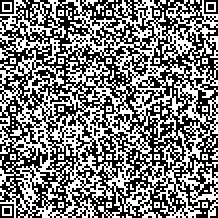
In comparison, the Base64-encoded text ends up in a version 27 QR code (125x125), which has about 31% more modules, making it significantly denser.
➜ base64 -i 1024.bin -o 1024.txt
➜ zint --barcode QRCODE --secure=1 -i 1024.txt -o 1024.txt.png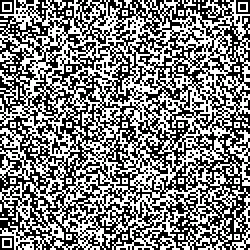
Larger, denser QR codes are generally harder to read than smaller ones, especially when the document containing them has been scanned or otherwise degraded. These optimizations might look small, but often translate to real-world improvements in read rates.
Reading binary QR codes
Most QR code reading libraries expose the raw data and a decoded text version.
For ZBar, the zbarimg CLI has to be called with the -Sbinary option, otherwise it will try to interpret the
QR code payload as UTF-8.
➜ zbarimg -Sbinary 1024.bin.png > out.binWhen using STRICH to read the QR code from an image, the rawData property on the detection contains
a Uint8Array with the
raw bytes:
import {StrichSDK, ImageScanner} from 'https://cdn.jsdelivr.net/npm/@pixelverse/strichjs-sdk@latest';

try {
    await StrichSDK.initialize('<your-license-key>');
    const config = { engine: { symbologies: ['qr'] }};
    const detections = await ImageScanner.scan(
        document.querySelector('img#example'), config);
    if (detections.length > 0) {
        console.log('Payload size (bytes): ' + detections[0].rawData.length);
    }
} catch (e) {
    // ...
}
Conclusion
Encoding binary data directly into a QR code instead of transforming it into Base64 or another textual encoding can help reduce the size of the QR code and improve its readability. Both the QR code generator and the QR code reader need to be configured appropriately for this to work.
For the Tarif 595 QR codes, switching to binary data could have reduced the number of QR codes used, or made the existing ones smaller and thus easier to read.