Published on: 1/18/2026 by Alex Suzuki
MSI Plessey
STRICH SDK 1.13 introduces support for the MSI Plessey barcode symbology.
Here’s an example of an MSI Plessey barcode encoding the value 1234567890:
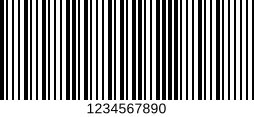
Key characteristics of the MSI Plessey symbology include:
- Introduced in the 1970s by the MSI Data Corporation
- Encodes numeric digits (0-9), no other symbols are supported
- Variable-length symbology
- optional Modulo-10 check digit
MSI Plessey is not a self-checking symbology, use of the Modulo-10 check digit is strongly recommended and enabled by default. As it is also a variable-length symbology, we also strongly recommend setting minLen and maxLen to match your use case.
Strarting with version 1.13.0, the SDK detects and decodes MSI Plessey barcodes if the msi-plessey symbology is enabled.
As we consider MSI Plessey a legacy symbology, it will not be enabled if “all symbologies” are configured by passing an empty symbology array.
Sample code for reading MSI Plessey using PopupScanner
In the following snippet, minLen and maxLen are both set to 8, and the default check digit processing mode (validate and strip a Modulo-10 check digit) is enabled.
import {StrichSDK, PopupScanner} from "https://cdn.jsdelivr.net/npm/@pixelverse/strichjs-sdk@latest";

// ... SDK initialization code ...
await StrichSDK.init('<your license key>');

const detections = await PopupScanner.scan({
  engine: {
      symbologies: [{ name: 'msi-plessey', minLen: 8, maxLen: 8 }]
  }
});
Under-the-Hood Improvements
STRICH uses WebGL for GPU-accelerated image pre-processing. After a review, some inefficiencies in texture handling and two unnecessary render passes were removed. This should result in a small but measurable increase in FPS, especially on low-end devices.